

Ria payment methods: All the ways to pay for a transfer online


When you send money online with Ria, you choose how to pay for it. You can fund a transfer from your US bank account, a debit or credit card, or a digital wallet like Apple Pay or Google Pay. If you’d rather pay in person, cash at a Ria location works too.
Each option balances speed, cost and convenience a little differently. Here’s how each one works, so you can pick the one that fits your transfer.
Want to compare costs before you choose? Enter your amount and destination on our send money online page to see the fee and exchange rate, no account needed.
Pay from your bank account (ACH transfer)
Linking your US bank account is usually the lowest-cost way to fund a Ria transfer. We connect to your account through the Automated Clearing House (ACH) network, the same electronic system US banks use for direct deposits and bill payments.
The first time you add a bank account, you’ll enter your routing number and account number. After that, it’s saved for future transfers.
Speed: typically 1 to 3 business days for the payment to process
Fee: generally the lowest of any payment method
Best for: larger amounts, or when saving on fees matters more than speed


Pay with a debit card
A debit card pulls money straight from your checking account, so there’s no bill to pay later and no interest to worry about. It’s quicker than an ACH payment and still fairly low cost.
We accept Visa and Mastercard debit cards. Prepaid debit cards may work depending on the card type and your bank, so check at the payment step.
Speed: usually within minutes to a few hours
Fee: low to mid, typically a little more than a bank account payment
Best for: sending quickly without credit card charges
Pay with a credit card
Paying with a credit card is usually the quickest way to fund an online transfer, and your recipient can often get the money within minutes. We accept Visa, Mastercard and American Express credit cards.
Speed: minutes in most cases
Fee: slightly higher than a debit card or bank account
Best for: urgent transfers where speed comes first
Heads up: Some card issuers treat money transfers as cash advances. That can mean a cash advance fee and a higher interest rate from your card issuer, separate from any Ria fee. This is your card issuer’s policy, not something we control, so check with them if you’re unsure.
For a step-by-step look at adding a card and what to expect from your bank’s security checks, read our guide on how to pay for a Ria transfer with a credit or debit card.


Pay with Google Pay
Google Pay lets you fund a transfer with a card already saved in your Google Wallet, so you don’t have to type card details on your phone. The payment goes through in a few taps.
It’s available to Android users in supported markets, online or in the Ria app. The fee and speed match the saved card you pay with.
Speed: same as the card behind it, typically minutes
Best for: Android users who want a quicker checkout
Pay with Apple Pay
Apple Pay works the same way on iPhone. You confirm the payment with Face ID or Touch ID using a card already saved in Apple Wallet, so there are no card details to enter.
It’s available in supported markets when you use the Ria app on iOS, with the same fee and speed as the saved card.
Speed: same as the card behind it, typically minutes
Best for: iPhone users who want a secure, quick checkout
Prefer to pay in person? Use cash at a Ria location
Not keen on using a card or bank account? You can pay in cash at a Ria store or agent location. Tell the agent where you’re sending and how much, hand over the cash, and you’re done.
Speed: depends on the delivery method you choose, such as cash pickup, but often fast
Best for: people without a bank account or card, or anyone who prefers handling cash
To find a Ria location near you, use our location finder or open the Locations tab in the app. Don’t have a bank account? Here’s more on how to send money without a bank account.
Ria payment methods compared
Here’s a quick side-by-side. Fees vary by destination and amount, so check the price calculator for the exact cost of your transfer.
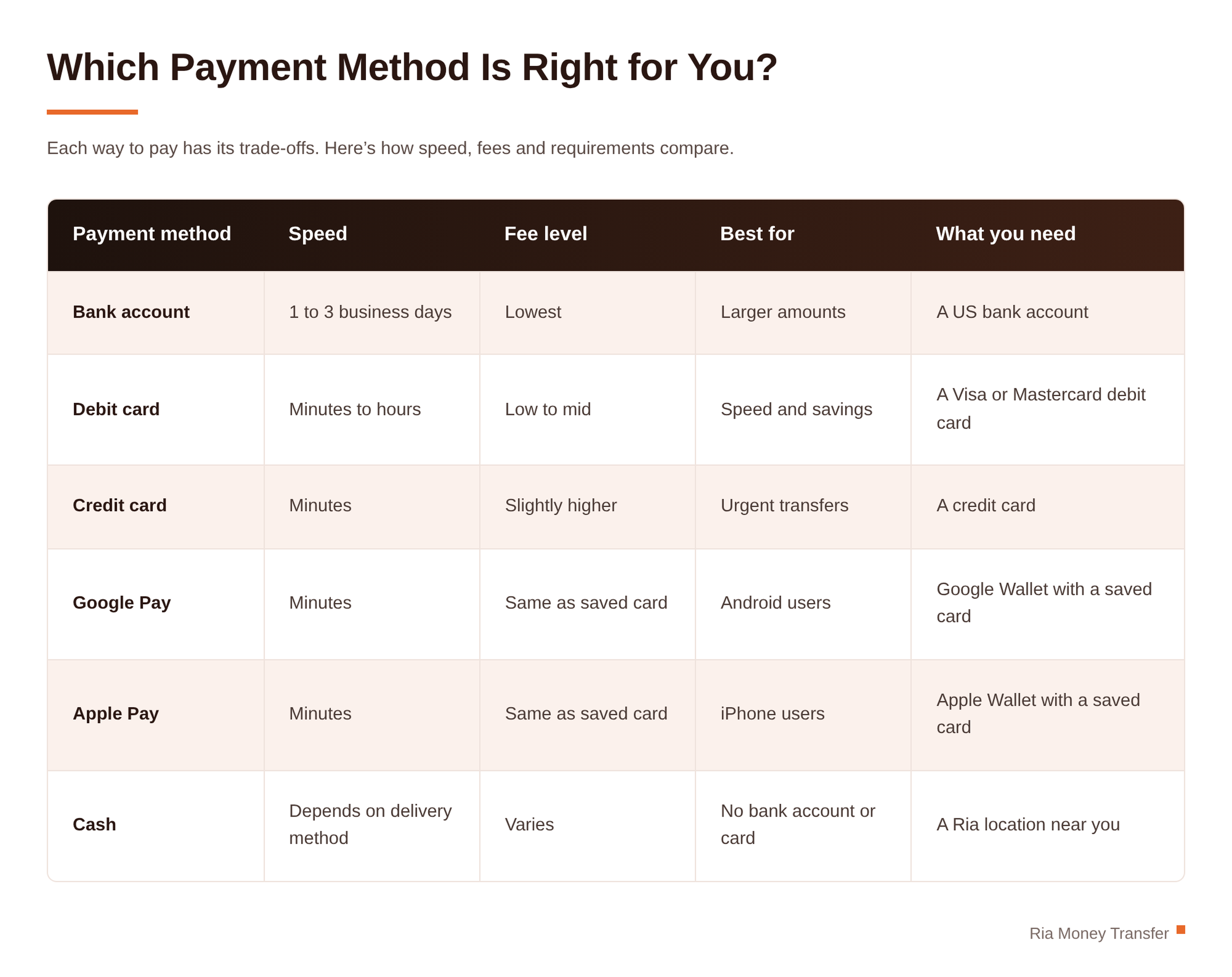 Curious what goes into the fee? Read how Ria’s fees and exchange rates work.

How to add or change your payment method
You can add a new payment method at checkout or manage saved ones in your account settings.
Log in at riamoneytransfer.com or open the Ria app.
Start a new transfer and go to the payment step.
Pick a saved method or choose Add new payment method.
Enter your details. They’re saved securely for next time.
To remove a saved card or bank account, go to My Account, then Payment Methods, and delete the one you no longer need.
Saved cards aren’t stored as plain numbers. Payment processors that handle card data have to meet PCI DSS, the payments industry’s data security standard.


FAQs
What's the cheapest way to pay for a Ria transfer?
A linked US bank account usually has the lowest fee. The exact cost depends on the amount and destination, and you’ll see it before you confirm your transfer.
What's the quickest way to pay for a Ria transfer?
Debit and credit cards, plus Apple Pay and Google Pay, usually go through within minutes. A bank account payment typically takes 1 to 3 business days to process.
Will my credit card issuer charge me extra?
It might. Some issuers treat money transfers as cash advances, which can carry their own fee and interest rate, separate from Ria’s fee. Ask your card issuer before you send.
Can I use a prepaid debit card?
It depends on the card type and your bank. Some prepaid debit cards work, so check at the payment step.
Do Apple Pay and Google Pay cost more?
No. They use a card you’ve already saved in your wallet, so the fee and speed are the same as paying with that card.
How do I remove a saved payment method?
Go to My Account, then Payment Methods, and delete the card or bank account you no longer need.
Choose your payment method and send today
Check the exact fee for your transfer in seconds, no account needed. Start your transfer and pick the payment method that works for you.
About the author

Gabriela Solis
Gabriela Solis is Ria's Senior Content Writer. Located in Querétaro, México, she focuses on telling stories that show the myriad human faces of remittances.
Related posts


How to receive money from the US via Bre-B
Getting money from family in the U.S.? Here's how to set up your Bre-B key, what to send the person paying, how long transfers take, and what to do if money doesn't show up.


Ria transfer limits to Mexico: How much can you send in 2026?
How much can you send to Mexico from the U.S. with Ria? See limits by payment method and state, the 1% tax on cash transfers and how to send more.


How to send money on WhatsApp with Ria: Your complete guide
Everything you need to send money with Ria on WhatsApp: what to have ready, transfer limits, payment, delivery options and how the chat works from start to finish.


How to Pay for a Ria Transfer With a Credit or Debit Card
Paying for a Ria transfer with a credit or debit card takes under a minute. Here's what it costs, how to save your card for next time, and why your bank might ask for 3D Secure verification.