)
)
How to Pay for a Ria Transfer With a Credit or Debit Card
)
)
Credit and debit cards are a quick, convenient way to fund a Ria transfer. Save your card once, and sending money takes about as long as it takes to pick a destination and hit confirm.
This guide walks through which cards we accept, how to add one to your account, costs and ID verification needs.
Which Cards Does Ria Accept for Sending Money?
Ria accepts the major card networks:
Visa
Mastercard
American Express
Both credit and debit cards on these networks work. If you’re in Europe, PostePay prepaid cards work too.
Virtual cards linked to Apple Pay or Google Pay are also supported in markets where those payment methods are available.
Whether a specific card works also depends on your bank: it needs to be enrolled for online, card-not-present payments, and the transaction needs to fall within your card’s spending limits.
What You’ll Need Before You Add a Card
Before you start, have these ready:
Your card number, expiry date, and CVV (the 3-digit code on the back, or 4 digits on the front for American Express).
Access to your phone or banking app, in case your bank asks for 3D Secure verification.
The billing address on file with your card issuer, if your bank requires it to verify the payment.
Having these on hand keeps the process to under a minute instead of pausing halfway through to track down a code.
How to Send Money With a Credit or Debit Card (Step by Step)
Adding a card takes under a minute:
Start a transfer and, under How will you pay, select Credit Card or Debit Card.
Click Add Card and enter your card number, expiry date, and CVV.
If your bank requires 3D Secure verification, you’ll be redirected to approve the payment (more on that below).
Once approved, your card is added and your transfer goes through.
The process is the same in the Ria app. Once a card is added, you can save it for future transfers, so it’s already there the next time you send.
)
)
Is There a Fee for Paying by Card?
Yes, and it’s shown to you before you confirm, so there are no surprises at checkout.
Check your rate on our Send Money Online page before you pick a payment method, no account needed.
Card payments typically carry a slightly higher fee than paying by bank account. Card networks charge processing costs on every transaction, and bank transfers don’t carry that same cost. In exchange, card payments are usually the faster option: your money can reach your recipient within minutes, while a bank transfer can take longer to clear.
Want the full picture on how we calculate costs? Read how Ria’s fees and exchange rates work.
What Is 3D Secure (3DS) Authentication, and Why Does Ria Use It?
3D Secure, usually just called 3DS, is an extra verification step your bank runs when you pay online with a card.
It isn’t specific to Ria. 3D Secure is a global standard maintained by EMVCo and used across Visa, Mastercard, and American Express to cut down on fraud for transactions where the card itself isn’t physically present.
Here’s what it looks like in practice:
You enter your card details on Ria’s site or app.
Your bank runs a real-time risk check. Low-risk payments can go through with no extra step, known as a frictionless flow.
If the risk check flags anything, you’ll get a one-time passcode by text or a prompt in your banking app to approve the payment. That’s the challenge flow, and it’s the version most people mean when they talk about 3DS.
The whole process adds about 30 seconds, and it protects you as much as it protects Ria: because the check confirms you, not just your card number, are authorizing the payment, it cuts down on the kind of card-not-present fraud that hits online purchases and transfers alike.
In the European Union and the UK, banks and payment providers are required to use Strong Customer Authentication for most online card payments, so you’ll see the 3DS step every time. In other markets, whether you see it depends on your card issuer.
Why Might Your Card Be Declined?
Most card payments go through without a hitch. When one doesn’t, it’s usually one of these:
3DS not enabled. Your card isn’t enrolled in 3D Secure. Contact your bank to activate it.
Failed authentication. You entered the one-time code incorrectly too many times. Wait a few minutes and try again, or switch to a different payment method.
Bank blocking international transactions. Some banks flag international money transfers as unusual activity. A quick call or message to your bank usually clears it.
Card limit reached. Your card may have a daily spending or international transaction limit. Check with your bank or try a different card.
Expired or incorrect details. Double-check the card number, expiry date, and CVV.
)
)
How to Avoid a Card Decline Before It Happens
A few habits cut down on declined payments before they start:
Make sure your card is enabled for online and international purchases. Some banks turn this off by default until you ask.
Keep your contact details current with your bank, so a one-time passcode has somewhere to go.
Check your daily or international spending limit before sending a larger amount.
If you’re sending from a new device or location, expect your bank to double-check with 3D Secure even on a card you’ve used before.
Can You Save Your Card for Faster Transfers?
Yes. Once you’ve added a card, the Ria app can save it to your account. Next time you send money, select the saved card and skip re-entering the details.
Saved cards aren’t stored as plain numbers. Payment processors that handle card data are required to meet PCI DSS, the payments industry’s data security standard, which is why a saved card is typically represented by a secure token rather than the number itself.
You can save multiple cards and manage them in your account settings. To remove one, go to your payment methods and delete it from there.
Curious what else has changed in the app? Check out our roundup of new card payment options.
Debit Card vs. Credit Card: Is There a Difference?
For Ria transfers, the two work almost identically. Both are fast, both go through 3DS, and both can be saved for future use. Here’s where they diverge:
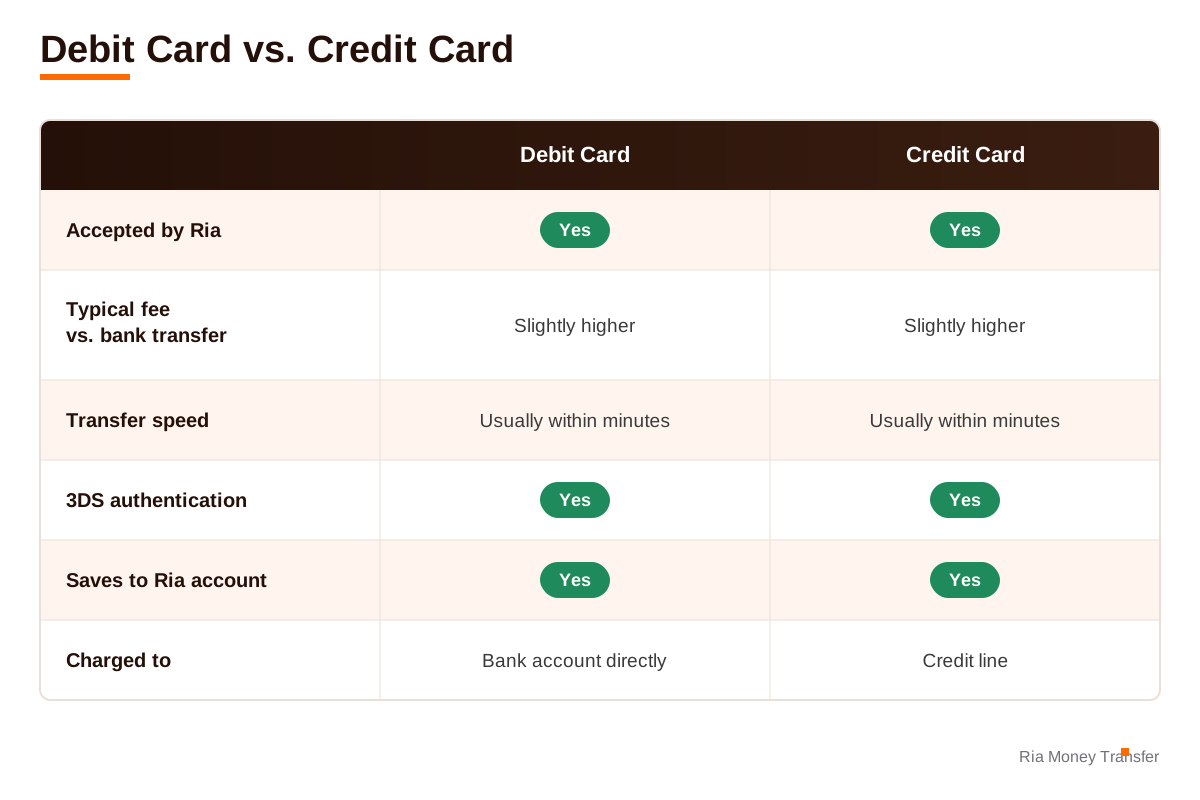 One thing worth checking with a credit card: some issuers classify money transfers as a cash advance rather than a purchase, which can trigger its own interest rate or fee from the card issuer, separate from Ria’s fee. When in doubt, ask your credit card provider how they categorize the transaction before you send.
FAQs
Can I use a prepaid card to send money with Ria?
It depends on the card network and your bank. PostePay prepaid cards work in Europe, and other prepaid cards on the Visa, Mastercard, or American Express networks may work if your bank allows them for online, card-not-present payments.
Is it safe to save my card details with Ria?
Saved cards go through the same 3D Secure checks as a one-time payment, and you can remove a saved card from your account settings whenever you want.
What happens if I close the 3D Secure verification window?
The payment won’t go through. Start the transfer again and complete the verification step when your bank prompts you.
Can I switch payment methods partway through a transfer?
Yes. If your card is declined or you’d rather not wait on 3D Secure, you can go back and choose a different payment method, such as a bank account, Apple Pay, or Google Pay, before you confirm the transfer.
Why does Ria ask for 3D Secure if I've paid with this card before?
Your bank decides when to run the check, not Ria. A new device, a new location, or a larger amount than usual can all trigger it again, even on a card you’ve used before.
Ready to Send? Add Your Card and Get Started
Card payments go through in minutes. See your rate first, no account needed.
Start your transfer at riamoneytransfer.com
)
)
About the author

Gabriela Solis
Gabriela Solis is Ria's Senior Content Writer. Located in Querétaro, México, she focuses on telling stories that show the myriad human faces of remittances.
Related posts

How Long Does a Ria Money Transfer Take?
The answer depends on how your recipient wants to receive the money. Here's the full breakdown.

How Ria's Fees and Exchange Rates Work
Here's exactly how Ria's fees and exchange rates work, and what it means for the amount that lands in your loved one's hands.
Ria Money Transfer Germany: Strong Compliance, Trusted Service
Deutsche Version unten. Every year, millions of migrant workers send part of their hard-earned money to their loved ones back home. These funds offer financial relief and even life-saving support to countless households around the globe. So, when a customer sends remittances through a money transfer provider, they place their trust in them. In return, []

What Documents You Need to Verify Your Identity with Ria
When you send money with Ria Money Transfer, security comes first. That’s why identity verification is required—not just as a step in the process, but as a way to protect you and your loved ones. In this guide, we’ll explain what documents you need, when verification is required, and how to submit them correctly—so you []